Beta Now Open — Limited Spots

The Video Editor Built for the Browser

Cut, trim, layer, and export professional-quality videos without installing anything. RenderFlow brings studio-grade editing to your browser tab.
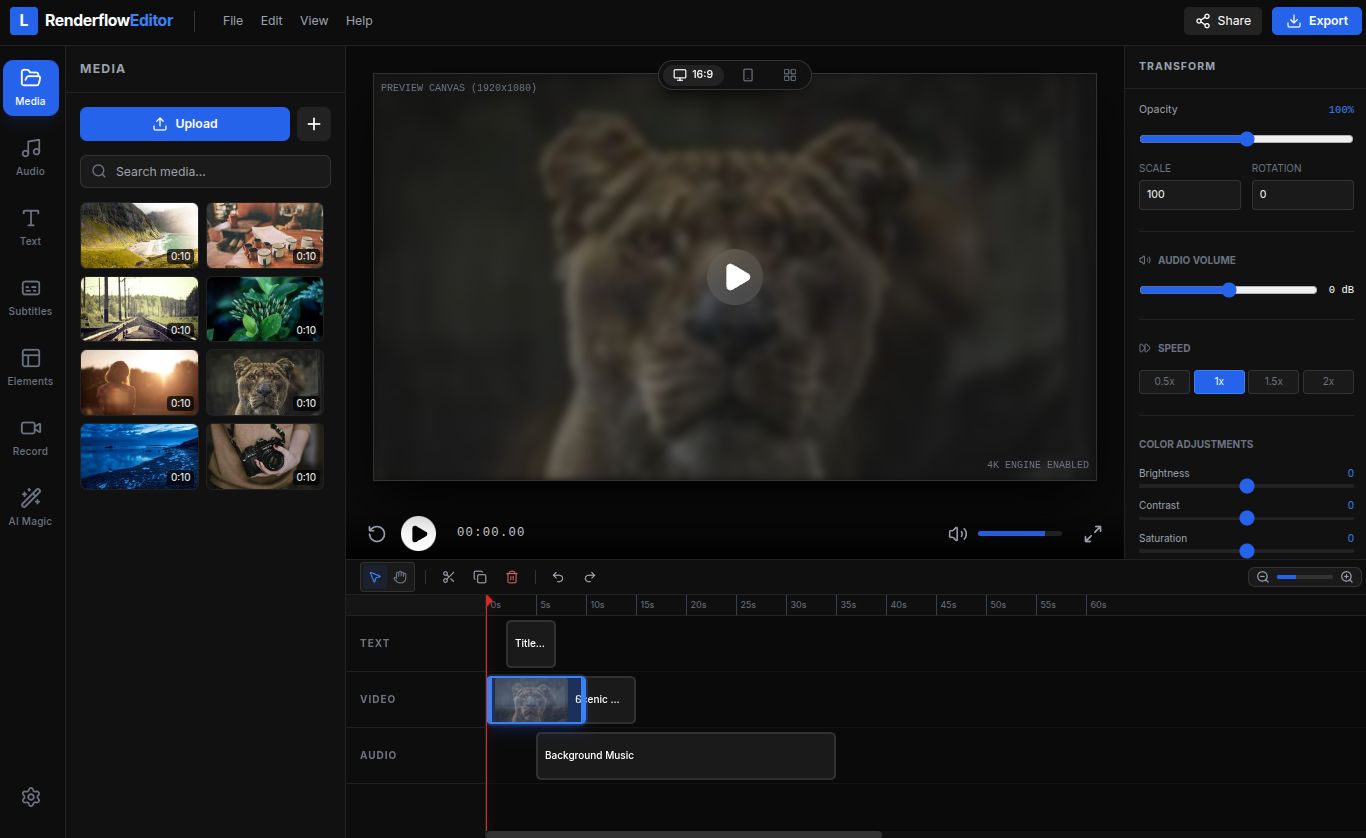
RenderFlow Editor - Professional browser-based video editing

Your complete online
video studio

Everything you need to produce polished videos, from rough cuts to final exports — no downloads required.

Now in Beta

Trim, split, and merge clips instantly

Drag-and-drop your footage onto the timeline and start editing immediately. Precision trimming, multi-track layering, and seamless transitions are just a click away.

Aa

Overlay text and graphics on your videos

Add captions, titles, lower-thirds, and custom graphics. Choose from dozens of font styles and animate text with built-in motion presets to make your content stand out.

Picture-in-picture and split screen layouts

Layer multiple video feeds for tutorials, reaction videos, or side-by-side comparisons. Resize and reposition each layer freely on the canvas.

Packed with everything you need

Professional features, zero learning curve.

Multi-track Timeline

Stack unlimited video, audio, and text layers with precision snapping.

Stock Media Library

Access thousands of royalty-free clips, images, and sound effects.

Background Music

Drop in audio tracks, adjust volume curves, and sync to your edits.

Filters & Color Grading

Apply cinematic color presets or fine-tune with manual controls.

Hardware Acceleration

WebGPU-powered rendering for buttery-smooth playback and fast exports.

Cloud Export

Export up to 4K and download or publish directly to social platforms.

Auto Captions

Generate accurate subtitles with AI-powered speech recognition.

Team Collaboration

Share projects, leave comments, and co-edit in real time.

Create a video in three steps

No account needed to start — just drag, edit, and export.

1

Upload your footage

Drag files from your computer or import from cloud storage. We support all major formats.

2

Edit on the timeline

Trim clips, add transitions, overlay text, and fine-tune audio — all in the browser.

3

Export and share

Render in up to 4K quality and download instantly, or publish directly to YouTube, TikTok, and more.

Supported Formats

MP4 MOV WebM AVI GIF MP3 WAV PNG JPG SVG

Frequently Asked Questions

Is RenderFlow really free during the beta?
Yes. During the beta period, all features are available at no cost. We'll introduce pricing tiers after launch, but beta users will receive a lifetime discount as a thank-you.
What file types and resolutions do you support?
We support all major video formats (MP4, MOV, WebM, AVI) and export up to 4K resolution. Audio files (MP3, WAV) and images (PNG, JPG, SVG, GIF) are also supported.
Do I need to install anything?
No. RenderFlow runs entirely in your browser. Just open the editor and start creating. We recommend Chrome or Edge for the best performance.
Are my projects stored in the cloud?
Projects are saved locally by default. With a free account, you can enable cloud sync to access your work from any device and collaborate with teammates.
How long will the beta waitlist take?
We're rolling out access in waves. Most users get access within a few days of signing up. You'll receive an email with your invite link as soon as a spot opens.

Trusted by early creators

Here's what beta testers are saying.

"I used to spend hours in desktop editors for simple YouTube cuts. RenderFlow lets me do the same thing in half the time, right in my browser."

M
Maya R.
Content Creator

"The timeline is incredibly intuitive. I onboarded my whole team and everyone was editing within minutes. This is the future of collaborative video."

J
James K.
Marketing Lead

"Auto captions alone saved me hours every week. Add the multi-track timeline and cloud export on top, and I honestly can't go back to desktop software."

S
Sofia L.
Podcast Host

Ready to edit your next video?

Join the beta waitlist and be among the first to experience browser-native video editing. No credit card required.

2,400+ creators already on the waitlist